Install help
CreepyDates install errors, starting with Move to Bin
A Move to Bin or Move to Trash button alone does not identify the cause. Read the full warning: an unverified developer, damaged files, and detected malware require different responses. No game-specific diagnosis from Hahadit was found. The guidance below comes from platform vendors, not a tested CreepyDates fix.
Match the sentence to the system
Use the wording on your screen, not a guess about the game file.
| What you saw | Likely system | Where to recover it |
|---|---|---|
| Developer cannot be verified / Apple cannot check | macOS verification warning | Check source and integrity before considering Apple's Open Anyway option |
| Will damage your computer / malware detected | macOS security detection | Stop; do not bypass or restore automatically |
| Windows protected your PC | Usually SmartScreen reputation protection | Read the full alert; not proof of a false positive |
| Threat blocked / quarantined | Microsoft Defender | Inspect Protection history; do not automatically restore |
| Install blocked | Android setting or device policy | Read the full message; unknown-source permission is not the only possible cause |
| Cannot open a Windows exe | Chromebook or another non-Windows system | No native ChromeOS package is listed; compatibility is not established |
Mac: Move to Bin
Apple's Safely open apps on your Mac distinguishes an app that cannot be verified from damaged software or known malware. For an unverified app only, Apple describes System Settings → Privacy & Security → Open Anyway after you have independently established that the app is trustworthy and unmodified. This is single-source vendor guidance, not evidence about this game's signing or safety. Do not disable Gatekeeper or treat a malware warning as an installation obstacle to bypass.
Windows, Android, Chromebook, iPhone
For Windows, inspect Microsoft Protection history before acting. A threat detection is not the same as a reputation warning. The fact that Microsoft offers restore controls is not a recommendation to use them for CreepyDates. The vendor docs are one source; no independent game-specific false-positive finding is available here.
For Android, Samsung's installation-permission guide describes per-app unknown-source permission on its devices (single vendor source). Menus vary by device and policy. Only grant permission if you trust the file; the listed download size is not a minimum-free-space specification.
For Chromebook, Google's ADB guide explicitly describes deployment without Developer Mode on supported setups. Developer Mode is therefore not universally required. Some setup changes or USB-only paths can involve resets and security trade-offs; do not powerwash or unenroll a managed device just for this game. This vendor documentation does not establish CreepyDates compatibility.
For iPhone/iPad, the developer tutorial describes Renpy Pocket and the PC file. Single-source developer report: it is a third-party-player workaround, not a native iOS package.
The game starts, then misbehaves
For in-game problems, keep the reports separate: flickering choices, a missing Ben sprite and developer reply, save replacement, and an EJ route stall. Each is one player thread, not a universal diagnosis. The developer says the moving mouse is intentional; that does not establish that every crash or input problem is intentional.
Questions
I clicked Move to Bin. Should I put it back and open it?
Not automatically. First establish whether macOS could not verify the developer or detected damage or malware. Do not restore and bypass a malware warning on the strength of this guide.
Windows said it protected my PC. Is that the same warning?
No. A SmartScreen reputation warning and a Defender threat detection are different. Read Protection history and leave detected threats quarantined unless you independently establish a false positive.
How do I install it in Turkish or another language?
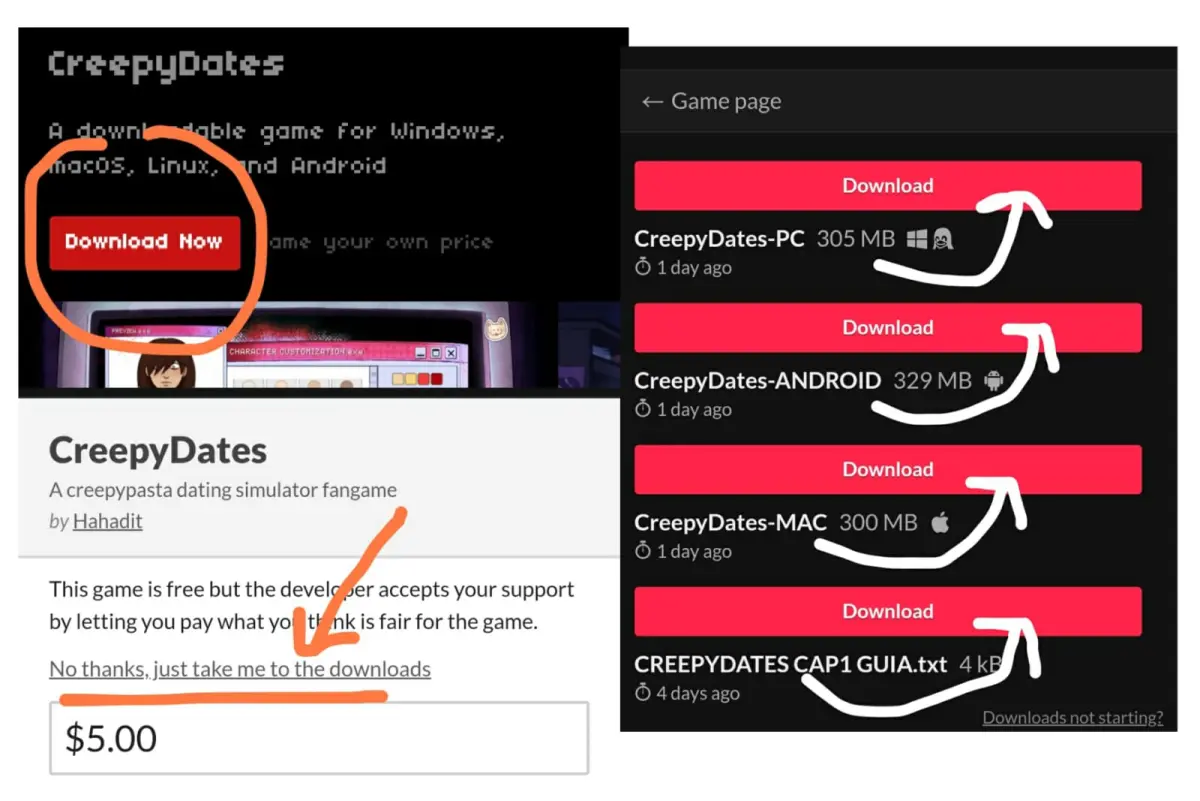
The game has no Turkish or Polish text. The install steps are the same: use the itch file for your system. In-game languages are Spanish, English, Portuguese, and Russian.